
The Model Context Protocol MCP has emerged as one of the most critical breakthroughs in modern artificial intelligence, fundamentally transforming how frontier language models connect to external enterprise databases, development environments, and software APIs. Often celebrated as the “USB-C standard for AI applications,” the Model Context Protocol MCP eliminates custom, fragile point-to-point glue code and establishes a universal, open standard for agentic software interoperability.
As enterprise teams transition from simple question-answering chatbots to autonomous multi-agent pipelines (as highlighted in our comprehensive AI Engineer Roadmap 2026), standardized tooling and secure context retrieval have become non-negotiable. In this detailed guide, we explore the inner workings of the Model Context Protocol MCP, breaking down its client-server topology, JSON-RPC 2.0 communication primitives, production implementation patterns, and enterprise architectural best practices.
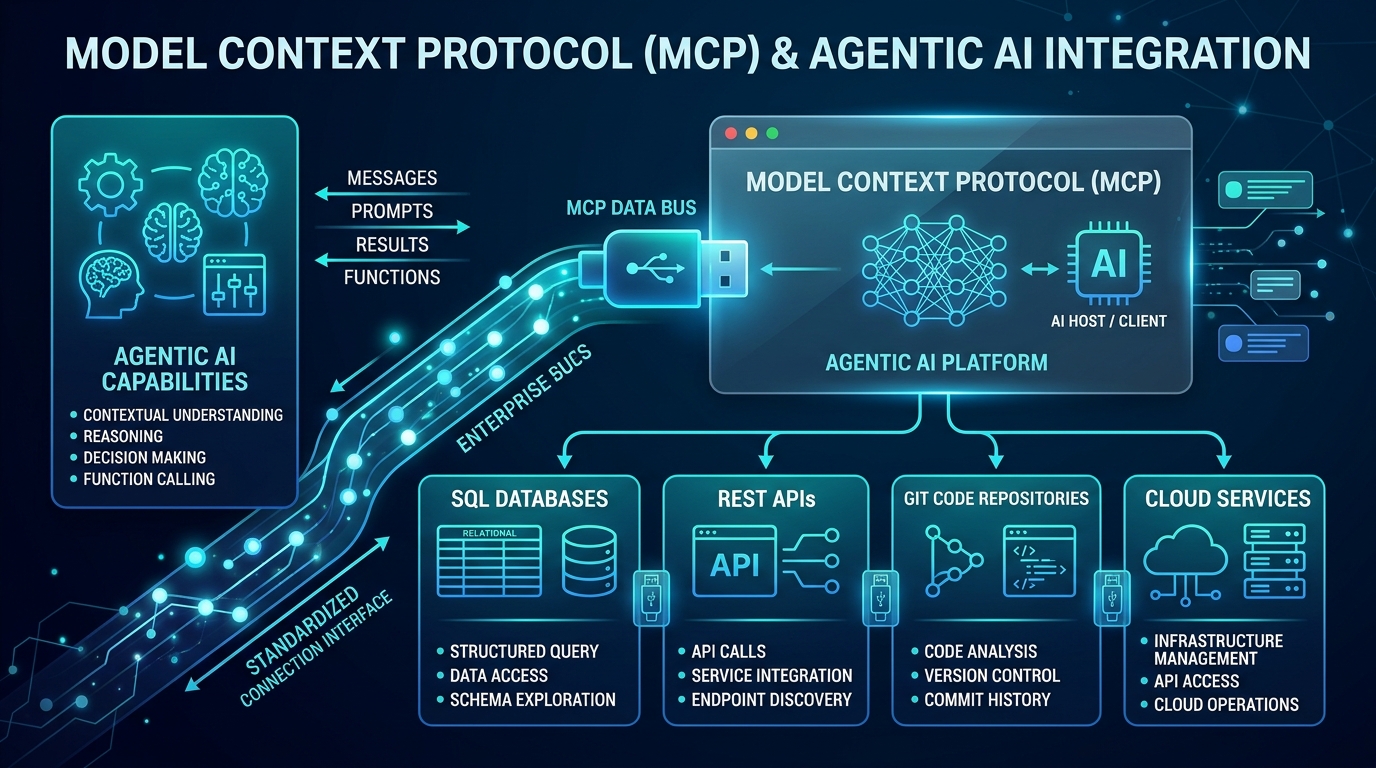
What is the Model Context Protocol MCP?
The Model Context Protocol MCP is an open-source standard originally introduced by Anthropic and rapidly adopted by leading cloud hyperscalers, IDE developers, and AI tooling ecosystems. At its core, the protocol solves the fundamental “M x N integration problem.”
Historically, connecting M different AI models (such as GPT-4, Claude 3.5 Sonnet, Gemini 2.0, or DeepSeek R1) to N distinct corporate tools (PostgreSQL, Jira, GitHub, Slack, Snowflake, and custom REST microservices) required building and maintaining M × N proprietary integrations. Each tool vendor implemented distinct SDKs, payload schemas, and authentication hooks. The Model Context Protocol MCP replaces this fragmented ecosystem with a unified M + N architecture: models implement a single MCP Client, while tools expose a single MCP Server.
Core Philosophy of Model Context Protocol MCP
- Decoupled Architecture: AI hosts remain decoupled from the physical runtime and business logic of the tool servers.
- Universal Transport: Native support for both local process execution (standard input/output –
stdio) and remote enterprise web services (Server-Sent Events / HTTP streaming). - Principle of Least Privilege: Explicit boundary enforcement ensuring models cannot access unauthorized internal data without deliberate tool invocations and user confirmations.
Core Components of the Model Context Protocol MCP Architecture
To implement the Model Context Protocol MCP effectively, developers must understand its four primary structural building blocks:
1. MCP Host
The MCP Host is the coordinating application where the user initiates an AI interaction. Common examples include AI-native IDEs (e.g., Cursor, VS Code with Copilot, Antigravity IDE), desktop clients (e.g., Claude Desktop), or enterprise workflow orchestrators. The host manages user permissions, controls which MCP servers are currently active, and renders responses generated by the model.
2. MCP Client
The MCP Client resides inside the Host application. It maintains an active 1:1 connection with one or more MCP servers. The client is responsible for protocol negotiation, sending structured JSON-RPC requests, receiving streaming responses, and routing contextual inputs into the language model prompt window.
3. MCP Server
An MCP Server is a specialized, lightweight program that wraps a specific data source or capability. For example, a PostgreSQL MCP server allows an AI agent to inspect database schemas and run read-only analytical queries. A GitHub MCP server exposes endpoints to read repository branches, summarize pull requests, and commit patches.
4. Transport Layer
MCP supports two primary transport mechanisms:
- stdio (Standard Input/Output): Ideal for local desktop workflows. The host spawns the server as a child subprocess and communicates over standard input/output streams. It is fast, isolated, and requires no external networking.
- SSE / Streamable HTTP: Designed for remote enterprise deployments. The client communicates with microservices hosted in Kubernetes clusters or serverless environments over HTTP using Server-Sent Events (SSE) for streaming message exchanges.
Three Primary Primitives Exposed by Model Context Protocol MCP Servers
Every server adhering to the Model Context Protocol MCP specification exposes three standardized capabilities to the AI client:
| Primitive | Purpose | Initiated By | Example Real-World Use Case |
|---|---|---|---|
| Resources | Read-only context data and file payloads | Application / User | Reading logs, configuration files, database schemas |
| Tools | Executable actions with side-effects or computations | Model (Autonomous) | Executing SQL queries, sending emails, triggering builds |
| Prompts | Pre-packaged workflows and prompt templates | User | Standardized code review checklists, triage guides |
Understanding JSON-RPC 2.0 Communication
Communication within the Model Context Protocol MCP utilizes standard JSON-RPC 2.0 messages. Below is an authentic example illustrating how an AI host discovers available tools from an MCP server:
// 1. Client Requests Available Tools
{
  "jsonrpc": "2.0",
  "id": 1,
  "method": "tools/list",
  "params": {}
}

// 2. Server Returns Tool Definitions with JSON Schema
{
  "jsonrpc": "2.0",
  "id": 1,
  "result": {
    "tools": [
      {
        "name": "query_database",
        "description": "Executes a parameterized SQL query on the analytics warehouse",
        "inputSchema": {
          "type": "object",
          "properties": {
            "sql_query": {
              "type": "string",
              "description": "The SELECT query to execute"
            }
          },
          "required": ["sql_query"]
        }
      }
    ]
  }
}
When the model decides to invoke this capability during its reasoning chain, it dispatches a tools/call request, which the MCP server executes locally before returning the structured result.
Building a Custom Model Context Protocol MCP Server in Python
Creating custom tools for the Model Context Protocol MCP is straightforward using the official Python FastMCP framework. Below is a complete, working example of an enterprise MCP server that provides mathematical analysis and system diagnostics:
# server.py - FastMCP Production Server Example
from mcp.server.fastmcp import FastMCP
import platform
import psutil

# Initialize the MCP Server
mcp = FastMCP("Enterprise-Diagnostics-Server")

@mcp.tool()
def get_system_metrics() -> str:
    # Returns current CPU, RAM, and OS diagnostics
    cpu_usage = psutil.cpu_percent(interval=1)
    memory = psutil.virtual_memory()
    os_info = f"{platform.system()} {platform.release()}"
    return f"OS: {os_info} | CPU: {cpu_usage}% | RAM Available: {memory.available / (1024**3):.2f} GB"

@mcp.tool()
def calculate_growth_rate(initial_value: float, final_value: float, periods: int) -> float:
    # Calculates the Compound Annual Growth Rate (CAGR) for financial reporting
    if initial_value <= 0 or periods <= 0:
        raise ValueError("Initial value and periods must be positive numbers.")
    cagr = ((final_value / initial_value) ** (1 / periods)) - 1
    return round(cagr * 100, 2)

if __name__ == "__main__":
    mcp.run()
To connect this custom server to any MCP-compliant Host (such as Claude Desktop or Antigravity IDE), add the following entry to your configuration JSON file:
{
  "mcpServers": {
    "diagnostics": {
      "command": "python",
      "args": ["/path/to/server.py"]
    }
  }
}
Enterprise Use Cases for Model Context Protocol MCP
Modern enterprises are standardizing on the Model Context Protocol MCP across multiple high-impact production domains:
1. Dynamic Enterprise Retrieval-Augmented Generation (RAG)
Traditional RAG pipelines require pre-vectorizing massive datasets into specialized vector databases. While powerful, static embeddings quickly become stale for dynamic systems (such as ticket queues, inventory levels, or financial trades). By deploying MCP servers over live databases, AI models can query real-time transactional data dynamically alongside vector searches.
2. Autonomous DevOps & CI/CD Orchestration
Software development agents powered by the Model Context Protocol MCP can inspect failing GitHub Actions logs, checkout target git branches, apply fixes, run local regression tests, and submit clean pull requests—all within a sandboxed, observable tool execution loop.
3. Cross-SaaS Workflow Automation
Rather than relying on closed, proprietary workflow automation tools, engineering teams can combine open MCP servers for Slack, Jira, Salesforce, and Linear. A single prompt can trigger a coordinated multi-step workflow spanning four distinct software services simultaneously.
Security Best Practices for Enterprise Model Context Protocol MCP
Always deploy MCP servers under the principle of least privilege. For database connectors, enforce read-only database credentials. When configuring tools capable of executing destructive actions (such as deleting files, dropping tables, or executing shell scripts), configure your MCP Host to require explicit human approval prior to execution.
Model Context Protocol MCP vs. Traditional REST APIs & Custom Function Calling
A frequent question among backend architects is how the Model Context Protocol MCP differs from conventional OpenAI-style Function Calling or standard REST endpoints:
- Beyond Simple Function Calling: Traditional function calling requires the host application developer to define JSON schemas manually for each API call within the prompt context window. MCP provides dynamic tool discovery, lifecycle management, and bi-directional streaming notifications.
- Context Sharing & Resources: Unlike standard REST APIs that return raw payloads requiring custom parsing, MCP resources include native MIME-type negotiation, chunked streaming, and standardized prompt templating.
- Ecosystem Portability: An MCP server written today works interchangeably across multiple foundation models (Claude, OpenAI, Gemini, local models via Ollama) without changing a single line of backend server code. For complete architectural documentation, visit the official Model Context Protocol documentation.
Frequently Asked Questions (FAQ)
Is the Model Context Protocol MCP limited to Anthropic models?
No. While originally initiated by Anthropic, the Model Context Protocol MCP is an open-source standard. Any AI model, host application, or local open-weights LLM (such as Llama 3 or DeepSeek) can connect to and utilize MCP servers.
What programming languages are supported for writing MCP servers?
First-party SDKs are actively maintained in Python (using FastMCP) and TypeScript / Node.js. Active community implementations also exist for Go, Rust, C#, and Java.
How does MCP handle user authentication and authorization?
In local stdio environments, MCP servers inherit the user’s local operating system permissions. In enterprise remote HTTP/SSE deployments, authentication is typically handled via standard Bearer tokens, OAuth2, or Mutual TLS (mTLS) managed by an API Gateway proxy.
Conclusion: The Future of Agentic AI with Model Context Protocol MCP
The transition from passive text generation to autonomous agentic problem-solving is the defining development in modern computing. By solving the interoperability challenge, the Model Context Protocol MCP provides the universal standard needed for AI models to safely, reliably, and intelligently interact with the software systems that power the global economy.
Whether you are building internal developer tools, enterprise RAG engines, or next-generation autonomous workflows, mastering the Model Context Protocol MCP is an indispensable skill for software engineers and AI developers in 2026 and beyond.
